
agentpprof: profiling AI agents with semantic flamegraphs
End of month, the bill shows the agent spent $3000. What types of work consumed that budget? How much went to code review, how much to debugging, how much to documentation? This question seems simple, but none of the existing agent observability tools can answer it directly.
agentpprof is a profiling tool built for exactly this question. It reads local
agent trace history and aggregates prompts and tool calls by semantic intent
into flamegraphs: width represents token consumption, execution time, or
operation count. At a glance, you can see where the budget went by category.
Currently supports Codex and Claude Code local trace files; other agents can be
added via the agent-session parser.
Limitations of existing tools
LLM observability platforms like LangSmith, Langfuse, and Phoenix can show token counts and latency for each call, but when you have 80000 calls, they can only arrange them by timestamp into a timeline. You can inspect each one and see "this call used 500 tokens," but you cannot answer "how much did review tasks cost in total." These tools are designed for single-trace debugging: timeline views help you locate the failing span at 14:03, span trees show call hierarchy, waterfall charts reveal parallelism. They excel at answering "what happened" but for the question "where did the budget go by category," inspecting 80000 spans one by one simply does not scale.
Datadog and Laminar are starting to move in the right direction with semantic classification. Datadog uses topic clustering to group user messages, Laminar uses Signals to extract structured events from traces. But their clustering primarily targets the distribution of user inputs, not "width represents budget share" aggregate views. You can see "30% of users asked about code," but not "code review consumed 40% of the token budget."
CPU profilers solved a similar aggregation problem long ago. Flamegraphs compress millions of function calls into one chart, width representing time share. The stack indicates context, and repeated calls to the same function merge into wider bars. This works because function names are deterministic: the same code path produces the same stack, and identical stacks can be directly merged.
Agent traces break this assumption. Prompts are natural language: non- deterministic, variable-length, multilingual, and often conversational. "Fix the bug" and "修一下这个 error" express the same intent but share no common string. If you use raw prompt text as frame labels, the flamegraph becomes too wide to read, with each prompt as an isolated bar, losing the point of aggregation. And raw prompts often contain sensitive information, making them unsuitable for sharing.
Semantic flamegraphs
agentpprof restores aggregation by introducing semantic tagging: mapping
free-form prompts to short, stable labels like debug, review, paper, or
misc. Once tagged, prompts behave like function names, and repeated activities
merge, and the flamegraph becomes readable.
The value of flamegraphs is not just aggregation but also stack-based causal
linking. Traditional CPU flamegraph stacks are function call chains:
main → parse → tokenize means tokenize was called by parse, which was called
by main. Semantic flamegraph stacks are agent behavior causal chains:
task:… → phase:read → action:read_or_search → object:src/main.rs means this
file read sits under a derived task, phase, and action. project, agent, and
session are pprof sample labels (go tool pprof -tags), not default stack
frames.
| Traditional CPU Flamegraph | Semantic Flamegraph | |
|---|---|---|
| Stack meaning | Function call chain | task → skill → phase → action → object causal chain |
| Aggregation | Same function name merges | Same semantic field values merge |
| Width meaning | CPU time share | token / time / operation count share |
| Question answered | Where does the program spend CPU | Where does the agent spend budget by category |
This causal linking lets you trace back or drill down from any layer: from a file being modified, trace back to which tool, which LLM decision, which user intent caused it; or from a prompt category, see what LLM calls, tool executions, and system effects it triggered.
agentpprof exposes several projections over the same data, each answering a
different question:
| View | Width means | Primary question |
|---|---|---|
operations | one count per prompt/tool/LLM step | How many operations fall in each semantic path? |
tokens | reported token count (input/output/cache) | Which tasks/actions consumed the most model budget? |
time | duration in seconds | How long did each activity take? |
files | file/path effect count | Which paths were touched under which tasks? |
network | network/domain effect count | Which domains were contacted under which tasks? |
Default stack frames are
task,skill,phase,action,object,repeat,result,outcome (plus token for the
tokens view). Override with --stack, rewrite fields with --op-map, and
subset samples with --where. Start with tokens for cost hotspots, use
time for wall-clock, and use files / network for security audits.
Example Flamegraphs
Semantic Stack Overview
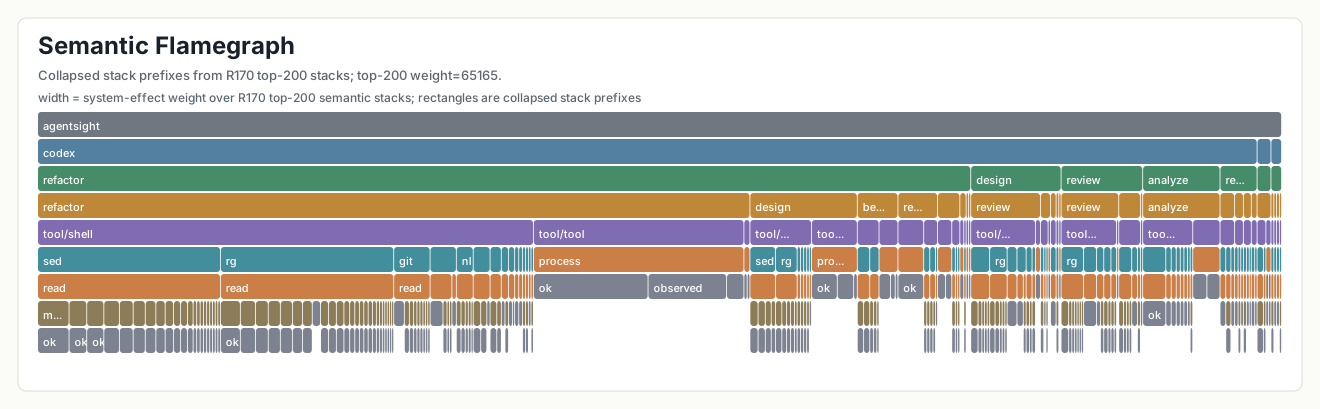
The figure shows the 200 highest-weight paths. Paths with the same opening frames share a rectangle; wider rectangles have greater system-effect weight. Paths end at different depths, producing an uneven outline.
Tokens View
Question: Which activities consumed the most model budget?

The token distribution aggregates by semantic stack frames (task, phase, action,
and so on). Historical gallery SVGs may still show older prompt: / call:llm/
prefixes; current agentpprof defaults to the operation-stack frames above.
Time View
Question: Where did wall-clock time go?

Wall-clock time distribution follows a similar pattern to token consumption: review (prompt:review) leads, followed by git, edit, docs, and code prompts. Continuation prompts (prompt:continue) appear frequently, reflecting a workflow pattern where complex tasks required multiple follow-up exchanges. The prompt:inspect category captures quick look-at-this requests that are common in iterative development.
BPF Benchmark Time

Width is elapsed seconds. LLM and tool frames make the upper outline especially uneven.
OSWorld-Human Operations
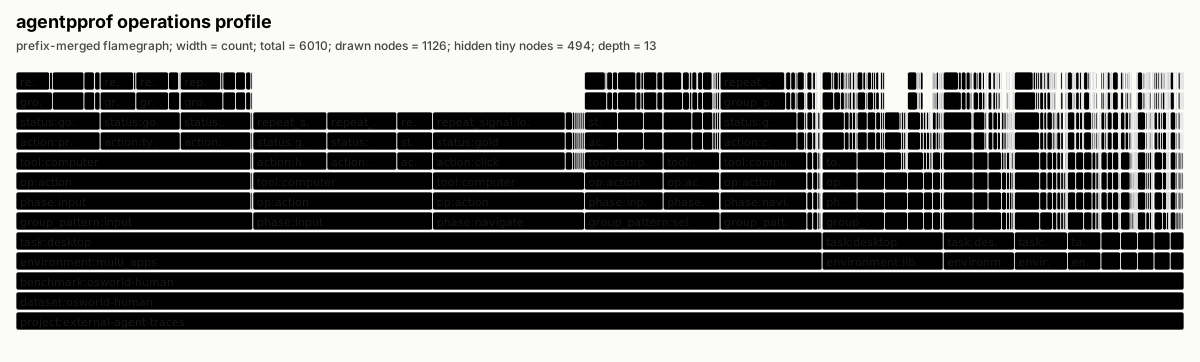
The figure folds 6,010 operations by shared stack prefix. Width is operation count; its frames end at different depths.
Files View
Question: Which parts of the codebase were touched and how?

File access patterns show heavy activity in collector/src/ (the Rust codebase) and collector/Cargo.toml, consistent with development work. External paths (external/tmp, external/home, external/codex) appear frequently, reflecting tool invocations that touch temporary files, home directory configs, and Codex session data. The flamegraph distinguishes between read and write effects, revealing the balance of inspection versus modification across both project and external paths.
Network View
Question: Which external services were contacted?

Network activity is sparse relative to file operations, confirming that most development work occurred locally. The contacted domains include anthropic.com for model inference, crates.io for Rust dependencies, github.com for version control, and various localhost ports for local development servers. Process chains visible in the upper frames show which tools initiated network requests, enabling attribution of network activity to specific agent actions.
Rendering
The SVGs merge shared stack prefixes and size each frame by the metric shown in the figure header. Stack depth sets the vertical row, so paths ending at different frames form an uneven outline.
Tagging
Mapping natural language prompts to stable semantic tags is not trivial. Prompts
in a single project may mix languages ("fix the 编译 error"), range from single
characters ("嗯", "ok") to long paragraphs, and include many fragments that make
no sense in isolation ("continue", "ok", system-generated context restoration
messages). To address these challenges, agentpprof provides a pluggable tagger
framework with multiple backends:
| Backend | Approach | Best for |
|---|---|---|
| Regex + Agent iteration | Pattern matching, rules iteratively refined by AI agent | Production, CI, reproducible analysis |
| LLM tagger | Local LLM inference via llama.cpp | Complex prompts, initial rule discovery |
| Python clustering | TF-IDF + K-Means unsupervised clustering | Exploratory analysis, finding natural groupings |
Regex Tagger and Agent Iteration Workflow
The regex tagger is the production default, but the workflow differs from traditional regular expressions. You don't need to hand-write all rules. The correct workflow is to have an AI agent observe actual prompt samples and iteratively refine rules until the unmatched rate drops below 5%.
AgentSight provides the agentpprof-flamegraph skill to guide agents through
this iteration:
- Run
agentpprof, observe the unmatched rate and sample prompts - Propose new
--tag-rulerules based on samples - Re-run and measure coverage
- Repeat until unmatched < 5% and distribution is reasonable (10-20 categories, no single category > 50%)
This iteration typically takes 5-10 rounds, 1-2 minutes each. The final rule set is deterministic and reproducible, suitable for version control and CI use.
By default there are no built-in rules, and all prompts are marked unmatched.
This is an intentional design choice: generic rules are unlikely to match your
project's actual prompt distribution, and blindly applying them produces
misleading aggregation.
Rule format is KIND:TAG=REGEX:
agentpprof -o tokens.svg \
  --tagger regex \
  --tag-rule prompt:review='(?i)review|diff|regression' \
  --tag-rule prompt:test='(?i)cargo test|pytest|unit test' \
  --tag-rule prompt:debug='(?i)fix|error|bug|broken'
KIND may be prompt, llm, or all. TAG must be a lowercase English word
between 3 and 12 letters. Rules are evaluated in command-line order; first
match wins.
For quick testing, use --preset to enable built-in demo rules:
agentpprof -o tokens.svg --tagger regex --presetLLM Tagger
For complex prompts or initial rule discovery, use a local LLM to generate tags. Run a llama.cpp-compatible server:
llama-server -m /path/to/model.gguf --port 8080
agentpprof -o tokens.svg --tagger llm --llama-url http://127.0.0.1:8080
LLM tags are cached in $XDG_CACHE_HOME/agentpprof/tags.json by default. The
LLM tagger output can serve as a reference for writing regex rules: observe
what categories the LLM produces, then write a regex rule for each.
Python Clustering Backend (Experimental)
For exploratory analysis, use the Python clustering backend to discover natural groupings in prompts. This backend uses TF-IDF vectorization and K-Means clustering, requiring no predefined rules:
# Export prompts
agentpprof --project-root . --format json -o prompts.json

# Cluster and generate tag cache
python ext/pprof/backend/python/cluster_tagger.py \
  --input prompts.json --output tags.json --show-info

# Use the tag cache
agentpprof --project-root . --tag-cache tags.json -o flamegraph.svg
The clustering backend automatically selects the optimal cluster count (5-25) and generates tag names from each cluster's keywords. This is useful for understanding "what natural categories exist in my prompt distribution" and can serve as a starting point for writing regex rules.
Install
After release, install via cargo install agentpprof, or download prebuilt
binaries from AgentSight GitHub release artifacts. The release pipeline builds
and smoke-tests both agentsight and agentpprof from the same release tag.
From a source checkout:
cargo run --manifest-path ext/pprof/Cargo.toml -- --version
cargo run --manifest-path ext/pprof/Cargo.toml -- -o agent.pb.gz
First profile
Generate a token profile for the current repository:
agentpprof --project-root . --view tokens -o tokens.pb.gzOpen the pprof profile with standard Go tooling:
go tool pprof -top tokens.pb.gz
go tool pprof -http=:0 tokens.pb.gz
Generate a browser-openable flamegraph instead:
agentpprof --project-root . --view tokens -o tokens.svgThe extension chooses the output format when --format is not provided:
agentpprof -o tokens.pb.gz  --view tokens   # pprof protobuf, gzip-compressed
agentpprof -o time.folded   --view time     # folded stack text
agentpprof -o files.svg     --view files    # standalone SVG flamegraph
agentpprof -o network.json  --view network  # redacted JSON summary and stacks
What data does it read?
agentpprof reads agent-native local trace history. Today that means Codex
and Claude Code JSONL files parsed through the agent-session crate. It does
not load eBPF probes, require root, or record a live process. It is the offline
profiling side of AgentSight: use agentsight to observe live system behavior,
and use agentpprof to aggregate already-recorded agent traces.
By default, it scans recent local traces that match --project-root:
agentpprof --project-root /path/to/repo --view tokens -o tokens.svgFor repeatable analysis, pass explicit trace files:
agentpprof \
  --project-root /path/to/repo \
  --session-file ~/.codex/sessions/.../session.jsonl \
  --session-file ~/.claude/projects/.../session.jsonl \
  --view tokens \
  -o tokens.folded
Useful selectors:
agentpprof -o tokens.svg --agent codex
agentpprof -o tokens.svg --session-id 019ec5
agentpprof -o tokens.svg --session-tag debug
agentpprof -o tokens.svg --prompt-tag review
The stack model
The semantic flamegraph stack is a projection over operation field bags, not a
literal function call stack. Default frames are
task,skill,phase,action,object,repeat,result,outcome (plus token for the
tokens view). project, agent, and session are pprof sample labels
(go tool pprof -tags), not default stack frames. Override frames with
--stack, rewrite fields with --op-map, and select subsets with --where.
The tokens view uses model budget as the width:
task:fix_parser;skill:unscoped;phase:llm;action:reason_or_report;object:current_task;result:token_usage_reported;outcome:…;token:input 4200
task:fix_parser;skill:unscoped;phase:llm;action:reason_or_report;object:current_task;result:token_usage_reported;outcome:…;token:output 980
The time view uses wall-clock duration (seconds) as the width:
task:fix_parser;skill:unscoped;phase:llm;action:reason_or_report;object:current_task;result:…;outcome:… 45
task:fix_parser;skill:unscoped;phase:test;action:run_validation;object:agentpprof/cargo.toml;result:completed;outcome:… 12
The files view makes repository paths the object frame:
task:write_docs;skill:unscoped;phase:write;action:edit_files;object:docs/flamegraph;result:completed;outcome:… 1The network view centers domains as the object frame:
task:publish;skill:unscoped;phase:network;action:collect_external_evidence;object:crates.io;result:completed;outcome:… 1Choose the view based on your question: tokens for cost analysis, time for performance analysis, files for impact assessment, network for security audits.
Privacy and redaction
Local agent histories can contain prompts, tool outputs, paths, commands,
repository names, and model responses. agentpprof is conservative by default:
- SVG, pprof, and folded outputs contain stack labels and weights, not raw prompts or model responses.
- JSON output redacts previews unless
--include-previewsis set. - Absolute paths outside the selected project root are grouped into stable
buckets such as
external/home,external/tmp,external/codex, andexternal/claude. - Private-looking domains are collapsed instead of exposing user-specific hostnames.
Use explicit --session-file inputs when you need repeatability. Use
--include-previews only for private debugging or already-sanitized traces.
Using agentpprof with AgentSight
agentsight provides live visibility (process trees, file effects, network
destinations), while agentpprof provides aggregate analysis (cost hotspots,
time distribution). A typical workflow is to record with agentsight, then
analyze with agentpprof:
sudo agentsight record -- claude
agentsight report
agentpprof --project-root . --view tokens -o tokens.svg
agentpprof --project-root . --view time -o time.svg
agentpprof --project-root . --view files -o files.svg
Troubleshooting
If no traces are found, pass explicit --session-file paths and confirm the
trace cwd matches --project-root.
If labels are too generic, add a few --tag-rule entries for the project. Do
not try to make every prompt unique. Good tags preserve useful semantic
diversity while merging meaningless long-tail fragments.
If pprof output opens but looks unfamiliar, remember that the sample unit is
not CPU time. Use go tool pprof -top to inspect the widest semantic frames,
then generate SVG or folded output when you need the full stack shape.
If a public artifact might contain sensitive information, prefer SVG, folded,
or pprof output, and do not pass --include-previews.
Continue exploring
Back to index
AgentSight: System-wide AI agent profiling and monitoring with eBPF
  
Previous
agentpprof: 用语义 flamegraph 分析 AI agent intent
月底账单显示 agent 花了 $3000。哪些类型的工作消耗了这些预算?代码审查占多少、debug 占多少、文档生成占多少?这个问题看似简单,但现有的 agent 可观测性工具都无法直接回答。
Next
Supported Agents
AgentSight works with any process that makes TLS-encrypted API calls. This page covers agent-specific setup and quirks.
- Last updated
- Aug 16, 2026
- First published
- Jun 23, 2026
- Contributors
- github-actions[bot], 云微
Was this page helpful?